
(This article related to Microsoft 365 Copilot only)
Has your tenant got the new Microsoft 365 Copilot wave 2 features in OneDrive yet?
My production tenant in trageted release was lucky enough to get them a few days ahead of the announcement on Sept 16th 2024. For clarity I am using OneDrive on the web or via the Teams app. Both of which have these capabilities.
Previously announced were the ability to generate a summary from a Copilt button in line with the file, such as shown below.

The other OneDrive feature we knew about prior to wave 2 was , including a summary when you shared a file using the OneDrive interface. I really love that this sumamry is of appropriate length for the file share email.
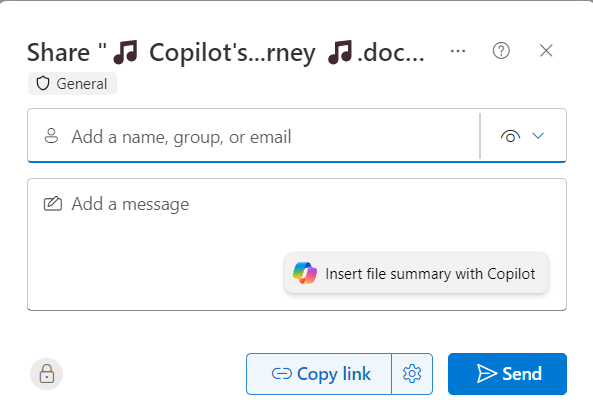
In wave 2 announcement Microsoft shared that OneDrive Copilot button was getting additional features.
- Compare multiple documents
- Ask a question across one or more documents
- Create an FAQ from a document
If you have the new features, you’ll see a new Copilot button on the toolbar in Outlook, which will be highlighted by an information pop up when you select a document.
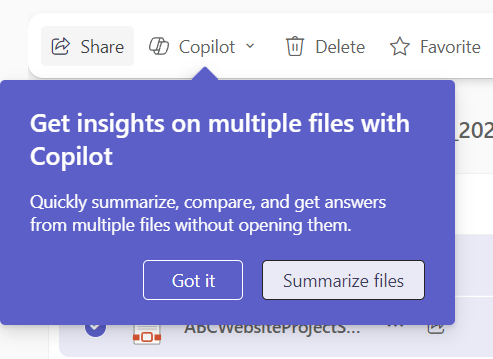
And once you select multiple files you’ll see the options available on that button.
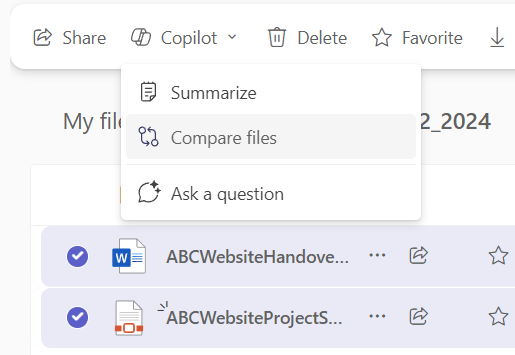
Currently these multiple file options appear to be limited to a selection of 5 files of type Word, Excel, PDF and PowerPoint but those file types can be mixed. Comparing files of different types is incredibly powerful and something I’ve been including in training courses. I love this new simplified way of triggering the comparison.
The Copilot button inline with the files has also expanded and offers not only summaries but an FAQ or your own custom question without needing to open the file first.

Remeber that these features are avaiable in the OneDrive experience which can be used to browse files across OneDrive, SharePoint & Teams and includes recent files screen with filters as well as other really useful ways to explore your files. If you haven’t taken a look at the OneDrive app recently, now if the time to do so.

 Copilot Queen Blog